Monday, September 3, 2007

Knytt


I found out about Nifflas' games this week. They are fun, polished, atmospheric platformers, well worth checking out. I started with Knytt, which focuses on exploration and atmosphere and is lighter on combat. Knytt Stories is a collection of games that add more combat to the mix (although many of them have an easy difficulty which removes some of the enemies). Within a Deep Forest is the oldest game, with a more difficult control scheme which involves moving a bouncing ball.

In all of the games Nifflas has assembled great atmospheric music from a variety of composers, and clean, charming tile design.

Initialization order

This week I've integrated the Chipmunk 2D physics library into my own game and have done the initial setup for my vehicle, based on the moon buggy tutorial that is available with the Chipmunk library.

Several problems reared their heads in the course of this. One is that, because Chipmunk uses basic Euler integration, springs can be made to misbehave very easily. If you dial the stiffness of the shock absorbers up, there is a point beyond which they overshoot in the integration step, which leads to wild oscillations and the complete destruction of the simulation.

The other big problem had to do with initialization order. This is a major problem in professional game engines, too. Here's an example from my program:

const vec2 chassis_verts[] =
{
vec2(-5, 1),
vec2(-2, 2),
vec2(2, 2),
vec2(5, 1),
vec2(6, 0),
vec2(6, -1),
vec2(5, -2),
vec2(-5, -2),
vec2(-6, -1),
vec2(-6, 0),
};
const int num_chassis_verts = sizeof(chassis_verts) / sizeof(chassis_verts[0]);

const float chassis_mass = 5.0f;
const float chassis_moment = cpMomentForPoly(chassis_mass, num_chassis_verts, chassis_verts, vec2(0, 0));

class Rover
{
public:

Rover()
{
chassis = new cpBody(chassis_mass, chassis_moment);
}

cpBody * chassis;
};

Rover g_rover;


The code above does not, in general, work.

In C, you can lay out data structures using initializers; the data is resolved into a memory image at compile time, so nothing needs to be done at runtime.

C++ has classes, which have constructors. If you make a statically-defined object, C++ inserts its constructor into a list of constructors to be run at startup. If one startup constructor depends on the results of another startup constructor, you may or may not get what you want, depending on the order they are run. In general you can't control the order (though some compilers have #pragmas for helping establish rough ordering), and the compiler makes no attempt to analyze dependencies to put them in the right order.

The original Chipmunk sample application dynamically allocated all of its objects. I generally try to avoid explicit dynamic allocation when I can since then you have to explicitly deallocate objects. The one thing explicit allocation does give you, though, is explicit control over the order in which constructors are run.

All this has made me think about whether other languages would be better. Lots of other languages would not have this problem, but they won't do any compile-time cooking of data, either.

At the moment I am debugging a problem with the wheels when the torque is too high.

Monday, August 27, 2007

Chipmunk

I discovered that the Box2D library doesn't do elastic collisions. After posting a comment to the Continuous Physics forum I was pointed to the Chipmunk library. Chipmunk is a freely available 2D physics library which is quite impressive. It's written in plain C so I had to do a little bit of work to get it to compile with my C++ compiler but I was able to get it and its demos compiling and running without too much effort. It turns out that Chipmunk comes with a “Moon Buggy” demo that sets up the basic type of thing I have been working toward:


I spent a fair chunk of time this weekend working on contact generation for collisions between two boxes. The disc/disc and disc/box collisions are easy since they only ever generate one contact, but boxes can lie against each other along an edge, which is typically represented using two contacts, one at each end of the touching line segment.

At first I thought that contacts would be any box corners that are inside the other box, but quickly found a counter-example:


I've spent/wasted some time making the Chipmunk library more C++-compatible: changing the vector class to support algebraic operators, using new/delete instead of malloc/free, and moving methods into the classes.

This week I'm going to try to replace my physics code with use of the Chipmunk library so I can get on with the experiment that I wanted to do in the first place: platform game mechanics using a wheeled vehicle.

Monday, August 20, 2007

Integrating Erin Catto's Box2D Library

I put in my time this week attempting to merge the functionality of Erin Catto's Box2D example physics library into my program.

My current box/box contact determination code only returns one contact (the most-penetrating point), so resting contact between boxes (with two contact points) doesn't work quite right yet. The contacts involving discs work fine since those only ever have one point anyway.

Erin's library assumes that all collisions are perfectly inelastic, so you can't make things bounce. The code for computing contact impulses in the normal direction assumes that we want the relative velocity to be zero and does its best to enforce that. This looks like it'll be a bit of work to untangle.


I found a cool little side-scrolling tank game called Terav by Ben Roth that does a lot of what I'm aiming for. Unfortunately it won't run under Windows Vista; it was created with GameMaker, several versions of which apparently just don't work under Vista. There are actually quite a lot of games that can't be run because of this. Fortunately I have an old machine with Windows XP on it so I was able to try out Terav. It's punishingly difficult (at least for me) but it does seem to have nice vehicle physics and it does a good job with enemy design.

Monday, August 13, 2007

Still Trucking

It sometimes seems like I've been working on the same programs all my life.

I first started writing a game about a truck driving across a 2D landscape when I was a child, in BASIC. There is a separate track-editing program. The game uses 40x25 text mode; the truck consists of two Os, an equal sign, and some underscores. The only control is to press Space to jump. Nevertheless, my brothers and I had a little bit of fun playing it.

Thanks to DOSBox I was able to actually run the program and get a screenshot:
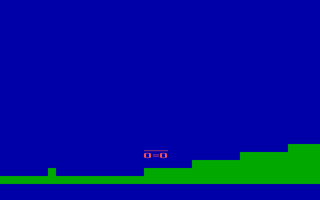


Here's the code:

5 INPUT "TRACK NUMBER? (NOTHING IF 1)"; T$
6 T$ = "TRACK" + T$
10 OPEN T$ FOR INPUT AS #1: DIM TRACK(300)
20 FOR X = 1 TO 300
30 INPUT #1, TRACK(X)
40 NEXT X
50 TRKPOS = 23: KEY OFF: SCREEN 0: WIDTH 40: COLOR 2, 1, 1: CLS : CLOSE #1
60 R = 1: FOR X = TRKPOS - 20 TO TRKPOS + 19
70 FOR H = 23 TO TRACK(X) STEP -1
80 LOCATE H, R: PRINT CHR$(219);
90 NEXT H
100 R = R + 1: NEXT X
110 TRKHT = TRACK(TRKPOS) - 1
120 COLOR 12
130 LOCATE TRKHT - 1, 19: PRINT "___"
140 LOCATE TRKHT, 19: PRINT "O=O"
150 GOTO 440
160 A$ = INKEY$
170 IF COUNT > 0 THEN GOSUB 470
180 IF TRACK(TRKPOS + 1) <= TRKHT GOTO 380
190 IF COUNT = 0 THEN IF TRACK(TRKPOS) > TRKHT + 1 GOTO 380
200 TRKPOS = TRKPOS + 1: R = 1: COLOR 2
210 FOR X = TRKPOS - 20 TO TRKPOS + 19
220 IF TRACK(X - 1) = TRACK(X) GOTO 310
230 IF TRACK(X - 1) < TRACK(X) GOTO 280
240 FOR H = TRACK(X - 1) - 1 TO TRACK(X) STEP -1
250 LOCATE H, R: PRINT CHR$(219);
260 NEXT H
270 GOTO 310
280 FOR H = TRACK(X) - 1 TO TRACK(X - 1) STEP -1
290 LOCATE H, R: PRINT " ";
300 NEXT H
310 R = R + 1
320 NEXT X
325 FOR SLOW = 1 TO 4000: NEXT SLOW
330 IF TRKPOS = 280 GOTO 710
340 IF A$ = "" GOTO 160
350 IF A$ = "G" GOTO 440
360 IF A$ = " " THEN IF COUNT = 0 GOTO 550
370 GOTO 160
380 COLOR 7: LOCATE 1, 1: PRINT "YOU CRASHED!"
390 PRINT "PLAY AGAIN?"
400 A$ = INPUT$(1)
410 IF A$ = "N" THEN END
420 IF A$ = "Y" GOTO 50
430 GOTO 400
440 A$ = INPUT$(1)
450 IF A$ <> "G" GOTO 440
460 GOTO 160
470 COUNT = COUNT + 1
480 IF COUNT = 2 GOTO 590
490 IF COUNT = 3 THEN 590
500 IF COUNT = 4 THEN RETURN
510 IF COUNT = 5 THEN RETURN
520 IF COUNT = 6 GOTO 560
530 IF COUNT = 7 GOTO 560
540 IF COUNT > 7 GOTO 560
550 COUNT = 1: GOTO 160
560 IF TRACK(TRKPOS) > TRKHT + 1 THEN IF TRACK(TRKPOS - 1) > TRKHT + 1 THEN IF TRACK(TRKPOS - 2) > TRKHT + 1 GOTO 650
570 IF TRACK(TRKPOS) = TRKHT + 1 THEN IF TRACK(TRKPOS - 1) = TRKHT + 1 THEN IF TRACK(TRKPOS - 2) = TRKHT + 1 THEN COUNT = 0: RETURN
580 GOTO 380
590 LOCATE TRKHT - 1, 19: PRINT " "
600 LOCATE TRKHT, 19: PRINT " "
610 COLOR 12: TRKHT = TRKHT - 1
620 LOCATE TRKHT - 1, 19: PRINT "___"
630 LOCATE TRKHT, 19: PRINT "O=O"
640 RETURN
650 LOCATE TRKHT - 1, 19: PRINT " "
660 LOCATE TRKHT, 19: PRINT " "
670 COLOR 12: TRKHT = TRKHT + 1
680 LOCATE TRKHT - 1, 19: PRINT "___"
690 LOCATE TRKHT, 19: PRINT "O=O"
700 RETURN
710 TRKPOS = 21
720 GOTO 50


The thing that strikes me about the code, looking at it now, is how short it is. The physical act of typing is a challenge for children; it behooves language designers to create concise languages that can do a lot in few characters.

In college I had another try at it in C, using a sprite animation library I'd written. I borrowed the image of a Nissan Pathfinder from a clip-art package, and wrote a script in Photoshop to rotate it to generate a bunch of orientations. My rigid-body dynamics skills were not up to the task then so I never got around to using all the additional orientations. The gameplay stayed pretty much the same as the old BASIC version, so it was fairly lame:
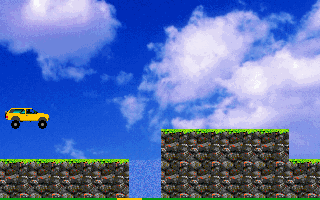


Thanks again to DOSBox for the screenshot; it's great to have emulators.

This week I have managed to get my old rigid-body dynamics code all moved over to my Direct3D-based game framework. There's a simple truck although it's not participating in the rigid-body simulation yet. I drew the mesh for it in Inkscape and then typed in the info by hand. Pretty tedious! I really should come up with a better solution for authoring meshes. In this case they're 2D, but they probably won't stay that way. Perhaps something like Blender would work. I'll have to look into that before I ramp up art production.
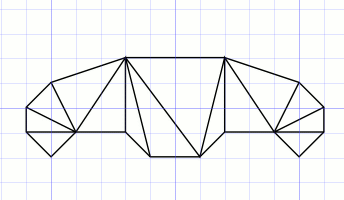


The truck and beginnings of a terrain just kind of sit there at the moment. I've got the old system of boxes and discs which are simulated overlaid on top:
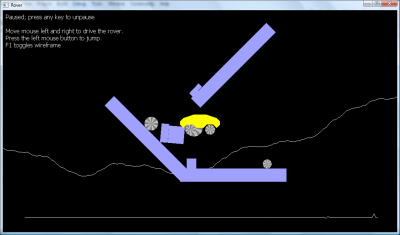


There's a mostly-straight line along the bottom of the screenshot; that's my frame-time graph. I spent a bit of time trying to figure out if there is any way to get completely glass-smooth animation, without occasional hitches. On my current laptop (a very recent vintage, Core 2 Duo Thinkpad) I get a noticeable hitch every few seconds. My program is not stressing the CPU or GPU at all so it seems like I should not have to put up with this. Unfortunately I have not found any way to do it, yet. I tried cranking my thread priority up to maximum; it made no difference.

Tim Sweeney of Epic Games has mentioned that he'd like to have something more flexible than object inheritance, and I ran into the type of situation that he was trying to deal with. I'll attempt to explain.

As I move my physics code I am thinking about how to modularize it so that it is distinct from the rendering code. Thus, objects will have physical and visual representations.

There is already a class hierarchy for the physical representations. Body holds all of the information common to all rigid bodies: position, velocity, angle, angular velocity, mass, and rotational inertia. Box and Disc derive from Body and supply a small amount of additional information each (width and height for Box, and radius for Disc), as well as the distinct intersection-testing behavior for their respective geometries.

On the visual side it is natural to want to have a class hierarchy as well. There would be a base class declaring a draw method, with derived classes for boxes and discs which would each implement draw in their own way.

It might be nice to be able to say that a RenderBody “is-a” Body because then it would contain all the properties of position and angle which are needed to draw in the right spot. However, if RenderBox derives from RenderBody, then it won't have the width and height defined in Box. If RenderBox is derived from Box then it won't be able to inherit the draw method from RenderBody.

The usual solution in C++ is to change “is-a” relationships to “has-a” relationships, but I think I'm going to end up having to write a lot of glue code. So for instance, one way to do things is to put a Body member in RenderBody. It would need to be a pointer so it can point to instances of Box or Disc. RenderBody would then implement methods for returning position and angle out of its Body member.

RenderBox and RenderDisc would create the appropriate Box or Disc instances and install them in the RenderBody class's Body pointer at construction time. Then, at render time RenderBox and RenderDisc would need to down-cast the Body pointer (which they can safely do since they know the type of object they constructed) in order to get at the width, height, and radius parameters.

There isn't generally any way to sort of “clone” an object hierarchy, adding members and methods at the top level (the draw method in this example) that are inherited down the tree.

Open classes (supported in some languages, e.g. Scala, I think) might be able to solve part of the problem. The basic idea is that you don't have to declare a class's entire interface in one place; you can add dynamically-dispatched functions elsewhere in the code. In this case I'd declare a standalone draw function that takes a Body, then supply definitions of that function for the Box and Disc subclasses.

I don't know whether open classes would allow you to attach additional data members to the original classes, though. If the draw methods require members that store mesh information, for instance, or colors for the objects, you'd have to find a different solution.

Inheritance in C++ serves two purposes: it defines a subtyping relationship, whereby an object of one type can be used as if it were of another type; and it supports reuse of implementations, so that an object of one type can automatically acquire all the members of an object of another type. These two purposes are linked (although you can separate them to some extent using abstract base classes and private inheritance).
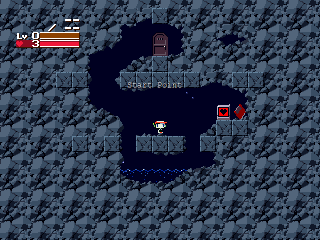


Finally, here's a list of 50 Really Good Indie Games. I can vouch for Cave Story (pictured above), which tops the list and is a free game.

Monday, August 6, 2007

Reviews: Might and Magic series

I was away all weekend in Brewster so I didn't get anything done this week.


Might and Magic was a long-running series of computer role-playing games. I played primarily installments four through six. This is not to be confused with the Heroes of Might and Magic series, which is also a great series of games. The capsule description of these games is: goofy but incredibly fun.


The quality trailed off rapidly after number six; interestingly, that was approximately the same point at which New World attempted to change their art style. Up until then they had used every crayon in the box, with favor toward none. This was replaced in later games by a pretty generic “realistic” look (read “look Ma, I'm using 3D Studio!”).

Might and Magics 4-6 had many good points, though. The interface holds up surprisingly well, especially when compared to other RPG franchises from that time period. The games did a great job of giving you a feeling of progress. Your characters gain ridiculous numbers of levels (at least compared to anything Dungeons-n-Dragons based). #6 had vast armies of monsters which would give you enormous difficulty early in the game but could all be felled with a single spell later on.

Quests were nicely handled. You would get a quest from a person. After completing it you would go back and get thanks and a reward. Often you would also get a title of some sort (something like “Savior of Smallville”) which went into a special screen for collecting honors. Any time you talked to the quest-giver again they would offer their profuse thanks. It really gave a good sense of accomplishment.

Travel tedium was reduced carefully as you proceeded. The games all came with a poster-sized map of the world. At first you'd have to walk from place to place. (Although, in 4 and 5 if you knew the names of the towns you could travel there instantly using the travel mirrors.) Later on you'd acquire spells that gave you better and better travel options.

Might and Magic 6 marked the series' transition from grid-based design to full 3D. They did a pretty good job with the transition. The world is divided into zones; each zone can be cleared of enemies, upon which it will reset in a few months of game time. The reset keeps travel from becoming boring and demonstrates your characters' growing prowess as the monsters become easier and easier to vanquish.

Dungeon design was highly varied, especially in the grid-based games. I remember one dungeon that was laid out as a crossword puzzle, for instance.

Another nice touch in Might and Magic 4 was that you could eventually acquire your own castle.

It's been a while since I've played these games but they are in my small set of games that I've played multiple times. I've also bought them several times over since I lend out the CDs and don't get them back. Highly recommended!

Monday, July 30, 2007

Aligned strings

Rigid Bodies

Rigid-body dynamics has been slow going. I did some work on changing over from a GLUT-based application to my DirectX-based framework; I want to start making it into a real little game, and my DirectX framework gives me smoother animation updates, full keyboard and mouse control, and minimizes CPU usage (which makes it play nice with other running applications). It's a pain to switch from OpenGL to Direct3D. They're both decent APIs now but OpenGL (when paired with GLUT) just takes a lot less coding overhead for quick-and-dirty programs. It's much easier to think in OpenGL, at least for me. I've been using both for a decade, so it's not really a matter of familiarity with one over the other.

I could keep OpenGL as the rendering API and use DirectInput by itself for keyboard and mouse input. Some games do this, and it works all right. Microsoft has made sure that OpenGL never works quite as nicely as Direct3D for games, though. It's been years since I've done professional games programming in OpenGL on Windows, so maybe I'm all wrong, but back when I was doing it, you had to use an undocumented interface to get full-screen access with OpenGL, and when you did, all the other windows on the desktop got moved down to the lower-right corner of the screen. You may remember playing PC games like Quake 2 that had this effect. You'd exit your game and find all your windows huddled down in the corner.

Aligned Strings

When I was in high school in the early 90s I worked in a group that made an operating system. The OS had been originally written in PL/1 and semi-automatically translated to C shortly before I signed on.

In the C family of languages #include dependency management is a continual struggle, although the same problems apply to some extent to any large system written in a modular language. During development (i.e. all the time) the interfaces between modules are in flux; functions move about. Before IDE assistance it was tedious to figure out which header files to include. Moreover, over time source files end up including more header files than necessary, which slows down compilation.

Precompiled header files address this problem in one way. You essentially have one giant header file with every declaration, and every source file includes it. The gimmick is that that header file is pre-parsed so it loads more quickly.

We put together a different solution that was used for a decade or so. The idea was to scan all the source files and create a database of global symbol declarations. A second scan for uses of global symbols allowed the tool to fabricate a custom header file for each source module containing just the global declarations it needed. Each source file included exactly one header file, so compilation was quick.

The key to this was being able to understand the C code enough to extract global symbol declarations, and to identify global symbol usages. In C if you stay away from tricky use of the macro preprocessor it's not too hard to do. I wrote a parser for the subset of the C grammar dealing with global definitions. In theory we would have had to understand more of the language in order to recognize global symbol usages; we fudged on that by simply including declarations for global symbols whenever we saw their identifiers, regardless of whether the identifier was really a global symbol usage.

This brings me to the subject of parsing. In my tests at the time something like 80% of the time was spent breaking the input into tokens. It takes a lot of time simply to traverse all that text. It turned out that a lot of that time was being spent in string comparisons, looking up identifiers to see if they were reserved words.

To speed up string comparisons we came up with aligned strings. The idea is to treat strings as sequences of 32-bit (or 64-bit) words instead of as sequences of 8-bit characters. The string is kept aligned on a word boundary, and the end is padded with zeros to fill an integral number of words. Then, string comparisons can be done four times (or eight times) faster.

There's a small amount of memory overhead required due to the padding (1.5 bytes per string on average, if you're using 32-bit words), and you have to copy characters out of the input stream into aligned strings before comparing them against other aligned strings.

The only other downside I can think of off-hand is that strings don't necessarily sort in alphabetical order. On a big-endian architecture they do, since the character lowest in memory compares first, then the next. On a little-endian architecture the effective character comparison order is: 3, 2, 1, 0, 7, 6, 5, 4, and so on.

If the specific string ordering is not important, though, I think aligned strings are hard to beat. I'm surprised there hasn't been a string class with this behavior. Maybe there are some other downsides I haven't thought of. It worked great for us all those years ago, though.